There are hundreds of word processors out there and to be honest, I doubt there is a perfect one for every writer. Each writer utilizes what works for them. For me though, it’s Scrivener.
Scrivener is a word processor that was created by the software company Literature and Latte and describes it as a word processor “created for writers by writers”. It has a 30-day free trial (Weird… NaNoWriMo is 30 days long.. coincidence?) and supports Windows, macOS, and iOS.
There are tons of different reasons to love this program, however, I’m going to hit on my top 3 favorite things about it (and pretty much the reason I use it for all my writing):
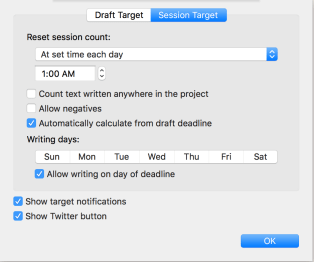
- Manuscript Targets: Holy crap – game changer! Throw out all those calendars (Ok don’t cause we all know we need to have at least 4 different places that we chronicle how well we or how poor we are doing during Nano), Scrivener will keep track of it for you and will tell you how much you need to write each day to hit your goal, even if you fall behind. Highly customizable, and probably one of my favorite parts of Scrivener. It even dings when you hit your goal!


- Compiling – Scrivener really does everything for you. You just focus on the writing and once complete (or if you need to share with your inner circle like I do) you can compile it into pretty much any format (PDF, Mobi, Word Doc, epub, etc). Still highly customizable, you can set it up to spit out whatever you need it to be.
- Notes section: Sometimes when I am writing, I don’t have time to do specific research or I get an idea of a later scene and I don’t necessarily want to break from my word processor to squirrel it away in my notebook (see below under outlines). The notes section is listed on every page you go on, whether it’s the individual project folder or the actual text document within the folder. I personally love this for jotting down errant ideas that are blocking me from my scene, but I also tend to notate any previous ideas from my outline for that chapter to help keep me on track.
Now there are several other things I love about this program (like listing what round of edits you are on and changing the color everytime you edit) but for NaNoWriMo, this is by far my favorite aspects of this word processor.
OUTLINES
So as I may have mentioned before, I love to hate outlines. Outlines are awesome in the way that they are like a linear video game. You always know the next place you are going to go – so typically, you aren’t sitting around thinking “What’s going to happen in the next chapter?” which then can lead to the dreaded writer’s block.
But they aren’t perfect either. As mentioned in the above article, a lot of times we don’t know the whole ending, and while we can plot or outline several of the chapters, there is a point where either 1) we finish our outline that was written to a certain point or 2) Our characters completely derail the plot and we end up needing an entirely new outline. These scenarios can also lead to the aforementioned block.
Damned if you do; Damned if you don’t.
I personally try to always have the next few chapters outlined vs trying to have the entire WIP outlined. Reason being, it allows me to be able to stay on track but if my characters go in another way, I don’t fall into the rabbit hole of having to throw out my entire outline. The important step to this though is that your outline needs to be forever evolving. Never let yourself get to the last outlined chapter without at least outlining the next. I always try to stay about five chapters ahead of myself.
And while I do use Scrivener for all my writing needs, I also typically keep my ideas (unless they are jotted down scenes) and outlines in a notebook. Personally, I find it easier to see how the story evolves. I need to see those crossed out, marked up paper. As someone who began writing paper and pen, I love to pick out my fancy gel pens and buy a new notebook for each WIP. It gets my excitement going, but also gives me something portable so when I’m in class, work, doctor’s office, etc., I can still jot down my ideas.
And honestly, this process has gotten me out of NUMEROUS blocks. It’s the perfect brainstorming technique when you find yourself staring at that white screen.
Below is a few examples of my writing notebooks and how my process looks like. (Yes, I am a Happy Planner and a Bullet Journaler).

So what word processor do you write in? And do you outline/journal as you prep or when you are unable to actively write?

 Jamie Provencher
2 thoughts on “#Preptober Day 1: Word Processors and Outlining”
Pingback: #Preptober – And then my husband got sick – The Mad Ramblings of Meri
Pingback: #Preptober Day 3: Survival Kit – The Mad Ramblings of Meri